

Last updated: 2026/7/23 — reviewed against 2026 PSA/PhilSys policy
The Philippine Identification System issues national identity cards, also known as PhilSys ID. This digital ID system aims to achieve paperless and cashless transactions. In this article, we are going to talk about what a national ID is and how to register for it. If you have finished the registration and haven’t received the card, you will also find out how to track your national ID. As of 2026, registration is walk-in only; no online appointment is required, and you can access a Digital National ID through the eGovPH app the same day you register.
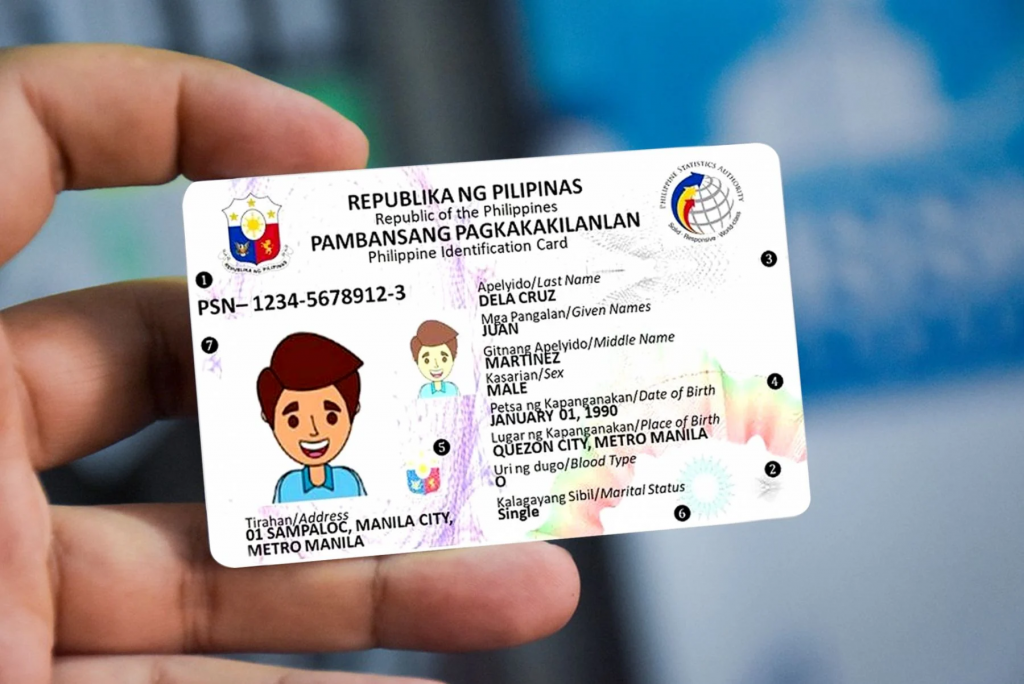
What is Philippine Identification System (PhilSys) ID
PhilSys ID, also called the Philippine Identification Card (PhilID), is an official identity document for Filipinos around the world and alien residents in the Philippines. A valid ID is required when dealing with some daily transactions, such as applying for social benefits, opening a mobile phone line, creating bank or investment accounts, filing taxes, registering for voting, enrolling in school, signing an employment contract, etc. In this case, you can present a PhilSys ID which carries a PhilID card number, name, gender, blood type, date of birth, place of birth, marital status, and a photograph. For Filipino citizens, the physical PhilID has no expiry date. For resident aliens, the card’s validity is tied to their current visa duration rather than a fixed one-year term.
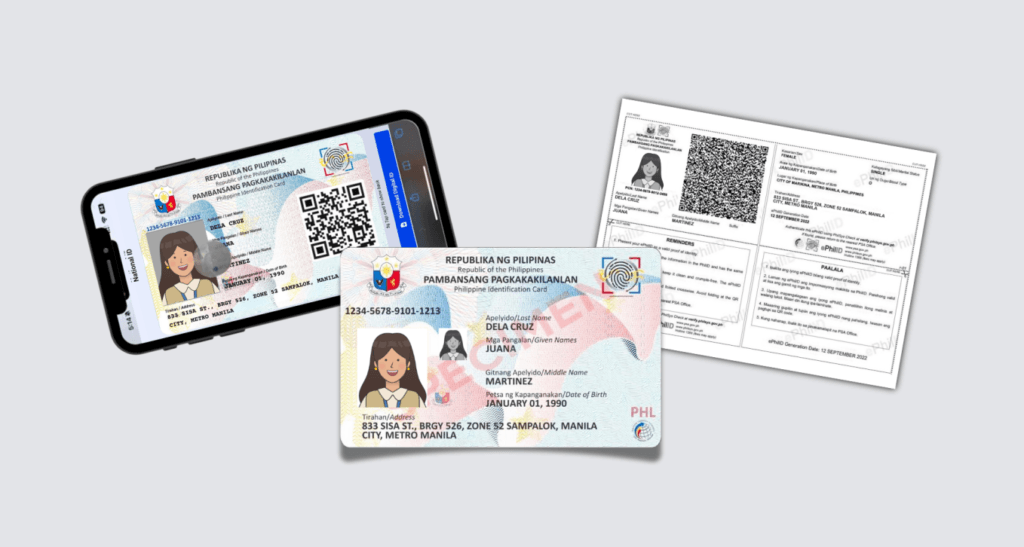
As of September 2025, PSA data shows over 54.9 million physical PhilID cards have been delivered nationwide. The system now issues three recognized forms of ID: the physical PhilID card, the ePhilID (a digital/paper copy), and the Digital National ID accessible via the eGovPH mobile app — all three carry the same legal validity.
National ID Requirements
Before heading to national ID registration, let’s talk about who can get it and what documents are requested.
You are eligible for the national identity card if you are:
- Filipino citizens, even with dual or multiple citizenships
- Overseas Filipino Workers (OFW)
- Filipinos living abroad
- Foreign nationals living in the Philippines for more than 6 months
Foreign nationals should prepare a valid Alien Certificate of Registration (ACR) I-Card issued by the Bureau of Immigration, or a valid foreign passport bearing a Philippine visa. OFWs can also register at PSA-designated counters inside select Department of Migrant Workers (DMW) offices, covering both departing and returning workers.
When going to the registration center, remember to take an original copy of one of the following supporting documents with you.
- Birth certificate issued by the Philippine Statistics Authority (PSA) and one government-issued photo ID that carries your full name and signature or fingerprint
- Valid passport or ePassport
- Unified Multi-Purpose Identification Card (UMID) issued by Government Service Insurance System (GSIS) or Social Security System (SSS)
- LTO Student Permit or driving license
If you can’t show the primary documents listed above, you are allowed to present any of the following secondary documents.
- Birth certificate issued by National Statistics Office(NSO) or Professional Regulation Commission (PRC)
- Integrated Bar of the Philippines (IBP) ID
- Professional Regulation Commission (PRC) ID
- Seaman’s Book
- Overseas Workers Welfare Administration (OWWA) ID
- Senior Citizen’s ID
- Social Security System (SSS) ID
- Pantawid Pamilyang Pilipino Program (4Ps) ID
- License to Own or Possess Firearms (LTOPF) ID
- National Bureau of Investigation (NBI) Clearance
- Police Clearance
- Single Parent’s ID
- Person With a Disability (PWD) ID
- Voter’s ID
- Postal ID
- Taxpayer Identification Number (TIN) ID
- PhilHealth ID
- Another country’s national ID
- Another country’s residence ID
Supposing that there is a full name, address, birthday, photograph, signature or thumbmark on the following documents, they are also acceptable
- Employee ID
- School ID
- Barangay Clearance
- Barangay ID
- City/Municipal ID
Registration and first-time issuance remain completely free for Filipino citizens. Resident aliens are subject to a separate registration fee — check the current amount with PSA before your visit, since this figure is periodically revised. Never pay a “fixer” or third party to expedite your registration; PSA does not authorize paid expediting.
How To Register a National Identity Card
PSA closed its online Step 1 pre-registration portal in February 2023 and moved fully to a walk-in system. As of 2026, walk-in registration is the only method — there is no online form to fill out beforehand and no appointment to book. The steps below reflect this current process.
Step 1: Go Directly to a Registration Center
Walk into any PhilSys Registration Center — these are set up in shopping malls, local government unit (LGU) offices, and PSA field offices nationwide. No prior booking or online form is required. PSA also runs mobile registration units that travel to far-flung and island communities to widen access.
Step 2: Present Your Documents and Complete Biometrics On-Site
Bring an original (not photocopied) primary or secondary supporting document. PSA staff will validate your demographic information and capture your biometrics in the same visit: fingerprints of all ten fingers, an iris scan of both eyes, and a front-facing photograph. Full biometric capture begins at age 5; biometrics are recaptured at age 15 to reflect physical changes since early childhood.
Step 3: Receive Your Transaction Reference Number (TRN)
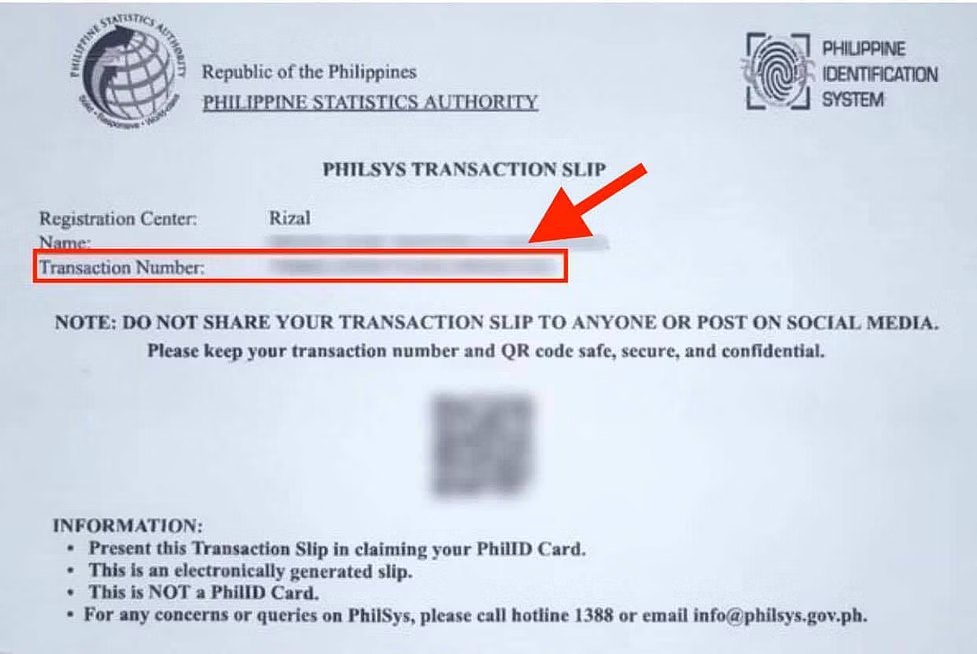
Once your biometrics are captured, you will immediately receive a Transaction Reference Number (TRN) on your transaction slip. Keep this safe — it’s required both for delivery tracking and for claiming your ePhilID.
Step 4: Access Your Digital National ID Immediately
You don’t need to wait for the physical card to start using your PhilSys identity. You can claim an ePhilID (a digital/paper copy) at the registration center using your TRN, or download the Digital National ID through the eGovPH mobile app, which typically becomes available within about 7 days of registration. Both formats carry the same legal validity as the physical card.
Three Forms of PhilID: Which One Should You Use?
| Format | How to Get It | Best Used For |
| Physical PhilID Card | Mailed to your registered address via PHLPost after processing | Long-term, in-person use; accepted everywhere |
| ePhilID | Claimed on-site at a registration center using your TRN, right after biometrics capture | Immediate proof of identity while the physical card is in transit |
| Digital National ID (eGovPH app) | Downloaded via the eGovPH mobile app, usually available about 7 days after registration | On-the-go verification using your phone; shows photo, PSN, and QR code |
Step 5: Wait For Your PhilSys ID
Once your PhilID is ready, the card will be sent to you by mail. Please show the transaction slip or any valid IDs to sign for it. Some physical cards are taking longer than usual to arrive due to processing backlogs — this is exactly why claiming your ePhilID or Digital National ID at registration is worth doing right away rather than waiting. If your card is delayed, you do not need to re-register; you can keep using your digital ID in the meantime.
How To Track National ID
It takes a few months to process PhilSys national ID registration and deliver it. It is annoying to wait aimlessly for the card. Therefore, the authority launched a national ID tracking system on the Philippine Postal Corp website. Let’s see how it works.
- Find the Transaction Reference Number (TRN)
It is a 30-digit number listed on your PHILSYS transaction slip, which is given to you while attending the appointment and submitting documents at the registration center.
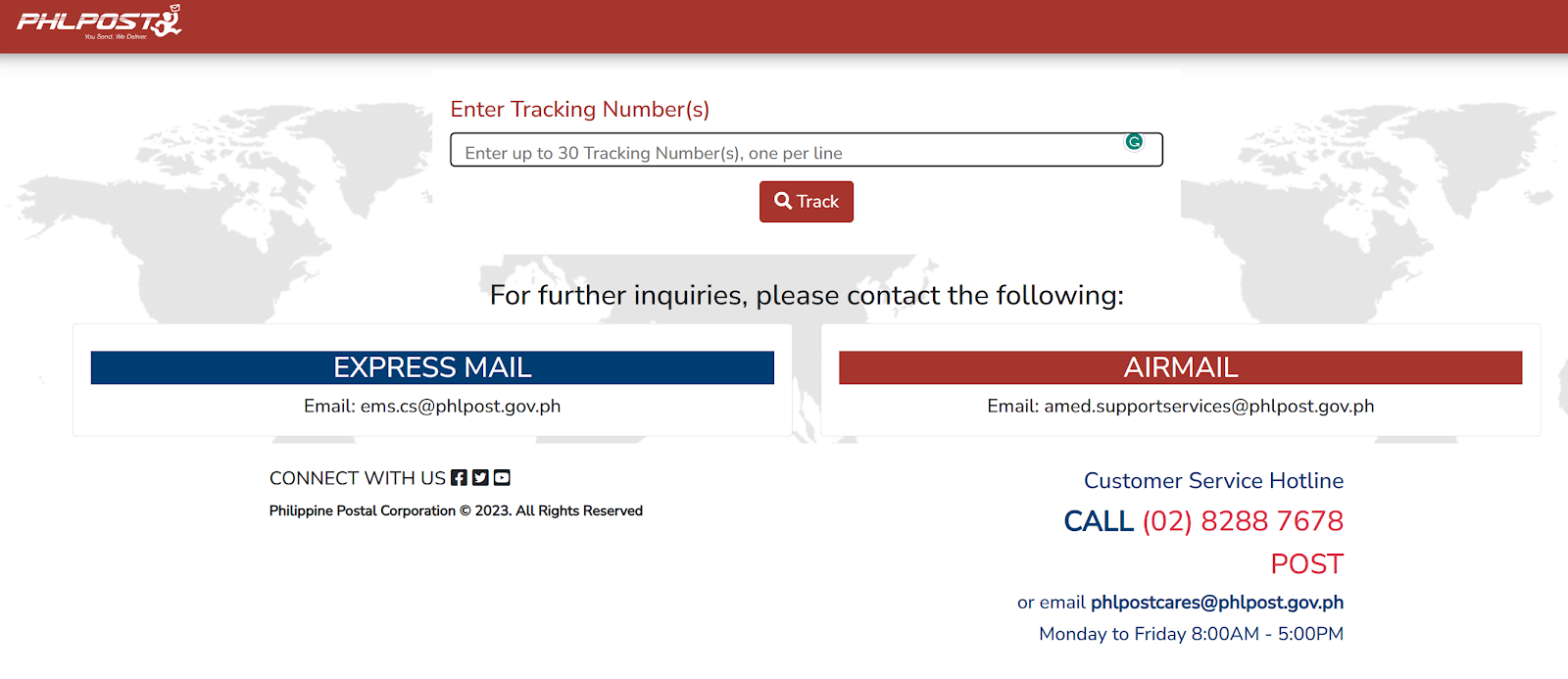
- Go to PHL Post Tracker
Enter the TRN and click on the “Track” button. When it says “Not found”, it means your application is still being processed, and you need to wait patiently. When it says “In Transit”, it means the card has been on the way, and you can check the delivery status.
You can also check your registration and Digital National ID status directly in the eGovPH app. If verification fails there, PSA advises visiting a registration center in person for assistance.
Avoid Registration Scams
PhilSys registration and first-time issuance are free for Filipino citizens. Do not pay any “fixer” or unofficial agent who offers to speed up your registration, appointment, or card delivery — this is not an authorized service and is a common scam pattern. For questions or to report suspicious activity, contact PSA through official channels only: the PhilSys hotline (1388) or info@philsys.gov.ph.
FAQs
Q: If I lost my transaction slip, can I claim my National ID?
A: Yes, as long as you can present another government-issued valid photo ID. Your registration record still exists in the system even without the slip — visit a PSA registration center with a valid ID to request TRN retrieval.
Q: How long does it take to receive my National ID card?
A: Generally, it takes 2 – 3 months to process your application or even longer in the case of extra requirements or a heavy workload. Timelines vary by region and have been affected by processing backlogs in 2026. You’re not required to wait idly — claim your ePhilID or Digital National ID immediately after registering to use in the meantime.
Q: Can I use my PhilID to replace other government IDs?
A: It depends on what you use it for. It is a basic proof of identification. However, it does not replace existing functional IDs. For example, you can‘t use it to replace a passport to travel abroad or replace a driving license to drive legally.
Q: How much does it cost to register a PhilSys ID?
A: The first national ID registration is free of charge, but you might be charged for replacement. Replacement of a lost or damaged card carries a fee, though it’s free if the error was the government’s fault. Resident aliens are also subject to a separate registration fee — confirm the current amount with PSA before your visit.
Q: Must I register the national identity card?
A: No, but it is suggested to have one because it is free and makes it more convenient to interact with government and private sectors, access government services, prevent identity fraud, and manage your personal information.
Q: Is there age limits for PhilSys national ID registration?
A: No. Full biometric registration — all ten fingerprints, an iris scan of both eyes, and a photograph — begins at age 5. Children are linked to a parent or legal guardian’s PhilSys record, and biometrics are recaptured at age 15 once physical characteristics have changed.
Q: What to wear for national ID?
A: According to PSA, your dressing should be presentable. Don’t wear white or light-colored clothes, sleeveless clothes, or heavy makeup. Eyeglasses, contact lenses, or facial piercings should also be removed while taking a shot.
Q: Do I need to book an appointment before registering?
A: No. As of 2026, PSA has fully moved to a walk-in system. The online pre-registration portal was discontinued in 2023, and no appointment booking is required — simply visit any registration center with your documents.
Q: What is the difference between ePhilID and the Digital National ID?
A: The ePhilID is a digital/paper copy claimed on-site right after registration using your TRN. The Digital National ID is accessed later through the eGovPH mobile app, usually within about 7 days. Both carry the same legal validity as the physical card.
Summary
Now that you have learned about what the Philippine Identification System (PhilSys) ID is and what it’s used for, we suggest you request one as there are no strict national ID requirements, complicated registration process, or expensive costs. Registration in 2026 is simpler than ever — walk in to any registration center with your documents, no appointment needed, and start using your Digital National ID the same day.
All you need to do is visit a registration center with your supporting documents and complete your biometrics on the spot. If you have waited for a long time and haven’t received the card, go to the national ID tracking system to check the reviewing or delivery status. Or, use your ePhilID or Digital National ID in the meantime. We hope you can get your national identity card soon.
 Dolores Xiao